When Bluesource started, migrations were our number one specialty. And they still are. Our dedicated migrations team works around the clock to provide the fastest possible migration with minimal interruptions.
Why Migrate Your Data?
System upgrades
Moving from on-prem to cloud computing
Disaster recovery and backup
Data consolidation for mergers and acquisitions
Years Combined Migrations Experience
0
Successful Migrations
0
PB Migrated
0
TB Moved in a day
0+
Common Migrations
Source
Destination
Enterprise Vault
Microsoft 365
SourceOne
Enterprise Vault
SourceOne
Microsoft 365
Barracuda
Mimecast
Google
M365
Tenant
Tenant
Proven Connectors
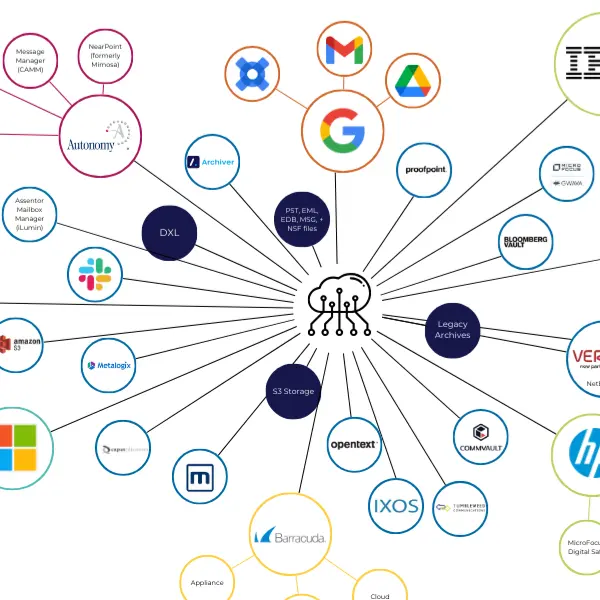
Bluesource supports a wide array of platforms. Bluesource analyzes and reviews file formats, database schemas, and API for any data connector. Proven data connectors take the guesswork and testing out of email migrations, legacy file migrations, and archive migrations.
Arctera (formerly Veritas)
Enterprise Vault for Exchange
Enterprise Vault for Notes
Enterprise Vault.cloud
Arctera Insight Platform (formerly Veritas Alta)
Microsoft Technologies
Microsoft Exchange Online
Microsoft Exchange On-Premises
Microsoft OneDrive for Business
Microsoft SharePoint Online
Microsoft Teams
Dell EMC
Dell (formerly Quest) Archive Manager
Dell EMC SourceOne for Exchange
Dell EMC SourceOne for Notes Dell MessageOne
EMC Centera/Atmos
EMC EmailXtender for Exchange
EMC EmailXtender for Notes
Hewlett Packard
HP / MicroFocus Digital Safe
HP RISS for Exchange
HP RISS for Notes
HP RISS/IAP
HP RISS/IAP for Exchange and Notes
HP RISS/IAP for Exchange and SMTP
Barracuda
Barracuda Appliance
Barracuda Cloud
Barracuda Rackspace (Rackspace Archive)
IBM
Commonstore
IBM Content Collector (ICC) / NetGovern
Google Workspace
Google Drive
Google Mail
Google Vault
Autonomy (part of OpenText)
Autonomy Consolidated Archives (ACA) (Zovy)
Autonomy Message Manager (CAMM)
Autonomy NearPoint (formerly Mimosa)
Autonomy ZANTAZ Digital Safe
OpenText
AXS-One
IXOS eCONserver for Exchange
IXOS-eCONserver (Open Text)
OpenText IXOS
OpenText for Exchange
Capax EAS for Exchange (Zantaz EAS; Capax EAS; Autonomy EAS)
Capax EAS for Notes (Zantaz EAS; Capax EAS; Autonomy EAS)
Unify Daegis AXS-One for Exchange
Unify Daegis AXS-One for Notes
Unify/Daegis Central Archive (formerly AXS-One)
Additional Connectors
Amazon S3
Assentor Mailbox Manager (iLumin)
Bloomberg Vault
GFI MailArchiver
GWAVA
iManage
DXL
Metalogix Archive Manager for Exchange (formerly PAM)
Mimecast
NetBackup (formerly HubStor)
Proofpoint
S3 Storage
Slack
Tumbleweed
File Types
EDB
EML
MSG
NSF
PST
Archive Migrations
Moving legacy files and email archives from one system to another requires strategy, planning, and expert knowledge. Free up resources and time, stay on budget, and meet regulatory demands with the help of skilled Bluesource data archive migration experts.
Email Migrations
Email migration technology has evolved over the years, and it remains a core part of our service offering.
Legacy File System Migrations
Avoid costly maintenance, lack of support and scalability, and the frustrations of aging infrastructure by migrating a legacy file system to an upgraded system. Moving from one system to another, or to a new version of the same system, requires the type of careful planning and expertise that Bluesource offers.
Our Migration Process
Scoping
Your environment is accurately sized
Setup
Software is installed; Test Migration Performed
Reconciliation
Chain of Custody Provided; Validation
Production
Data is continuously moved until complete
ArchiveMASHTM
ArchiveMASH is how Bluesource manages to migrate data with incredible speed and efficiency. We built ArchiveMASH to support scores of different data sources with a legally defensible process and complete documentation.
Our migrations team isn’t afraid of a challenge. We work with complex migrations, unique data requirements, and custom connections.
Fixing Failures
We don’t believe the standard acceptable failure rate of 4% should be the standard. Any migration failure that is fixable, we fix.
Manual Pulls
We routinely get 2-3x the data from manual pulls compared to other migration experts. We think outside the box to find solutions and drive results.
Legally Sound and Defensible
Bluesource migrations satisfiy even the strictest regulations by maintaining a full chain of custody. It tracks metadata and identifiers for all messages, including exceptions. When requested, the Bluesource migration team serves as experts by providing testimony or affidavits to back up the migration process.
Bluesource doesn’t just provide item count reports for migrations, we go beyond the basics. We’ll provide drilled down details of reconciliation efforts for errors encountered and offer details on our entire workflow for a project – even if it results in a 50+ page document.
One project involved migrating over 1 billion emails, totaling over 420 terabytes – a complete success with ZERO failures.
Collaboration
Bluesource consulting, training, and support teams have a depth of knowledge and expertise around archiving platforms. Years of experience with programs like Enterprise Vault, Mimecast, and Proofpoint means expert knowledge is shared across Bluesource.
Our Migration Policies
Filtering/Focus
Depending on the source, migrations can be filtered and prioritized by:
Date
Custodian
Content
Shortcuts
Read Status
eDiscovery Cases
Shortcuts / Stubs
Depending on the migration path and desired end-state, shortcuts or stubs can be deleted or replaced with their full item.
Folder Structure
Depending on the migration path, the folder structure can be maintained from one system to another.
Batching
Bluesource can coordinate with other migration efforts and split migrations into batches of users.
We use cookies to ensure that we give you the best experience on our website. If you continue to use this site we will assume that you are happy with it.